
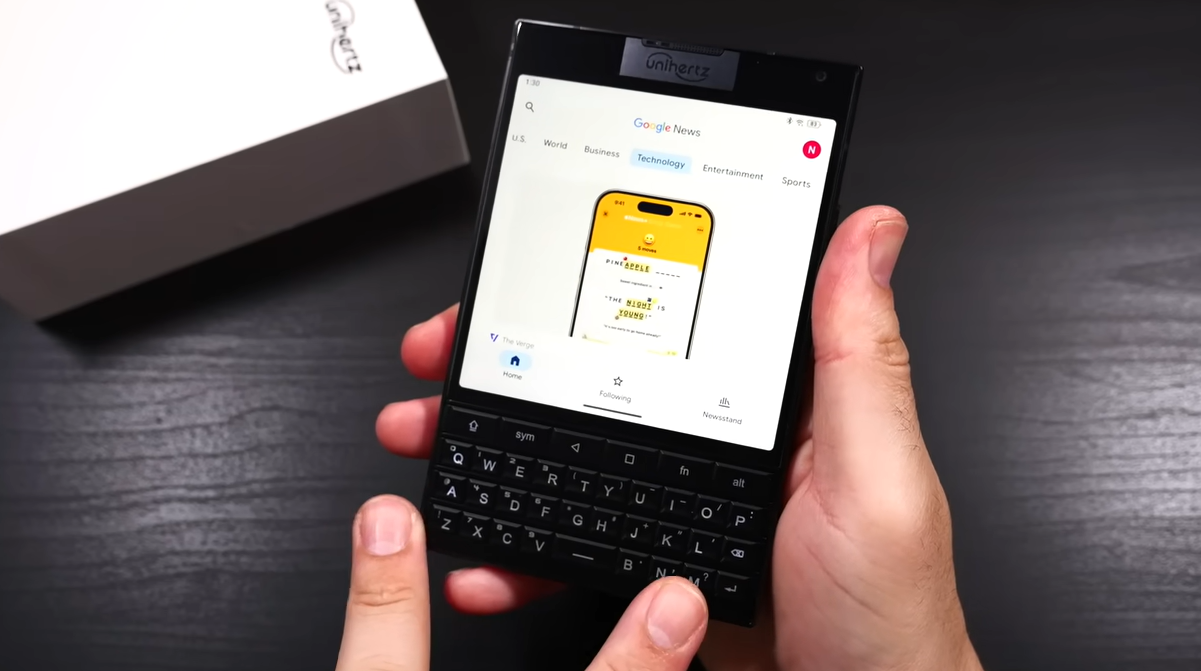

I recall turning on the Titan for the first time. You could tell right away that this phone wasn’t trying to impress you with its speed or thinness. It felt more like a tool instead. Thick, grounded, and especially unrepentant in its design choices. It feels solid in your hand—so long-lasting, even in the way it rests on your palm. Exploration is immediately encouraged by the actual keyboard beneath the square screen.
The rhythm produced by the reassuringly strong keys is unexpectedly pleasing. It recognizes intent in addition to registering input. Though it has a pleasantly modern design, this seems remarkably similar to the BlackBerry that many grew up clicking their thoughts into. Speed isn’t the only factor in every press. It’s all about control, and compared to typing on glass, that experience is noticeably better.
I started composing larger emails on a daily basis—complete sentences, well-punctuated messages, and well-considered responses. The Titan seems to rewire your habits without making any overt demands for them to change. Unihertz developed a hybrid that connects muscle memory and contemporary mobility by fusing this tactile experience with Android’s adaptability. It works; it’s not nostalgic for nostalgia’s sake.
The screen is square and effective, despite being modest by today’s standards. It feels surprisingly useful for reading PDFs and editing Google Docs. When combined with the keyboard, the odd 1:1 aspect ratio immediately demonstrates its remarkable effectiveness, despite initially appearing restrictive. The capacitive keys, which work like a little trackpad, allow you to scroll, providing an intuitive and exceptionally useful experience.
| Feature | Detail |
|---|---|
| Manufacturer | Unihertz |
| Model | Titan (and Titan 2) |
| Keyboard Type | Physical QWERTY, capacitive |
| Operating System | Android 10 (Titan), Android 15 (Titan 2) |
| Battery | 6000mAh (Titan), 5050mAh (Titan 2) |
| Display | 4.5-inch 1440p, 1:1 aspect ratio |
| Weight | 235g |
| Target Audience | Productivity-focused users, physical keyboard enthusiasts |
| Price | $299.99 (Titan), ~$400 (Titan 2) |
| External Reference | Unihertz Official Site |
In addition to reviving the physical keyboard, Unihertz provided it with fresh context. By permitting shortcut launches, key remapping, and custom behavior, users may customize the experience to fit their workflow. For example, I set my notes app to a long press on “N,” the calendar to “C,” and the flashlight to “F.” The result of these small changes was an unexpectedly effective interface that seemed customized rather than generic.
The Titan is especially notable for its battery life. Unihertz filled the void with perseverance while others chased millimeters and edge-to-edge screens. Even with Bluetooth, Wi-Fi, and GPS enabled, I used it for two full workdays without needing to recharge it. This type of dependability is now the norm rather than the exception.
However, the Titan’s strength is not its cameras. Yes, it takes pictures, but don’t count on flagship-level color depth or crispness. Dynamic range suffers in intense sunlight, while motion blur appears in low light. However, that is rarely a deal-breaker for Titan users. This is a phone for generating ideas while on the go, not for Instagramming your brunch.
Despite being innovative, the Titan 2’s rear display seemed more ornamental than practical. I eventually turned it off after testing the notifications and simple widgets. It’s not necessary, but it’s not badly done either. On the other hand, the thickness and weight are constant. Although it won’t vanish from your pants pocket, it looks great in a coat or purse and has a distinct style.
I wasn’t too wowed by the hardware specifications. It was the device’s quiet assurance. Unihertz is aware that not everyone is suited for this. They’re not acting as though it is. However, this is a really uncommon choice that doesn’t feel like a compromise for those of us who prefer the control and clarity of physical keys. More significantly, it fulfills its promise of tactile typing and is surprisingly reasonably priced for its feature set.
Unihertz is constantly improving the Titan series by means of smart feedback loops with its specialized user base. Even though they are rare, software updates do address community demands. Their staff appears to pay attention, whether it’s adjusting keyboard behavior or enhancing app scaling on square screens. That degree of involvement seems exceptionally creative, especially for a small firm.
People notice the Titan when I use it in public, not because it’s ostentatious but rather because it’s new. I was once asked by a teenager if it was a modified Game Boy. That kind of inquiry reminds me of the conversation, surprise, and differentiation that technology used to elicit.
The Titan is a dependable and surprisingly useful solution for those who type more than they swipe. It fills a void that no big brand seems interested in filling, even though it might not top the charts. Because of this, its existence is not only significant but also unexpectedly encouraging.
Not everyone will like the Titan. However, it’s more than simply a sentimental homecoming for those who find themselves yearning for real keys once more. It’s a gadget with a forward-facing design and retro bones. And in a field that moves more quickly than most of us can type, that is really uncommon.
